
Math
LaTeX formulas render with no setup — inline and as blocks, even while they stream.
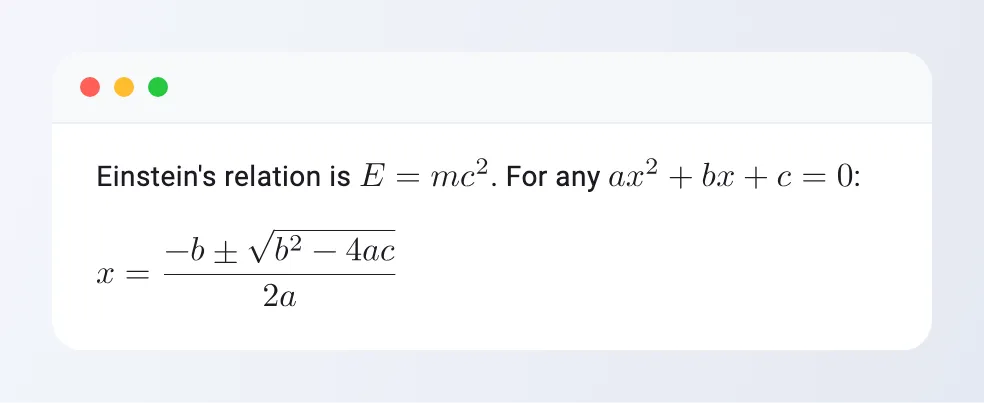
Einstein's relation is \(E = mc^2\). For any \(ax^2 + bx + c = 0\):
\[ x = \frac{-b \pm \sqrt{b^2 - 4ac}}{2a} \]
Syntax
Section titled “Syntax”\( … \) for an inline formula and \[ … \] for a block one — or $…$ and
$$…$$ with useDollarSignsForLatex, below.
Maths renders with no configuration.
val_latex_flutter is a
dependency of the package, and the built-in renderer uses it — falling back to
the raw TeX as text when a formula will not parse. A formula that is still
streaming in (\frac{a) renders what exists so far instead of failing.
Tapping a formula. onLatexTap is called with the formula and the part of
it under the finger:
GptMarkdown( reply, onLatexTap: (tap) => showFormula(context, tap.source, part: tap.tappedTex),)Your own renderer. inlineLatexBuilder builds an inline formula
(\( … \)) as a span, and blockLatexBuilder builds a block formula
(\[ … \]) as a widget. Each is handed one details object: the formula
(tex, after latexWorkaround; source, as written), the resolved style,
an onTap already bound to onLatexTap, and the stock formula
(defaultSpan() / defaultWidget()) to keep or wrap.
import 'package:val_latex_flutter/val_latex_flutter.dart' show Math, MathSpan;
GptMarkdown( reply, // A span: sits on the baseline and joins text selection. inlineLatexBuilder: (latex) => MathSpan( latex.tex, style: latex.style, onTap: (tap) => explain(tap.tex), ), // The stock formula, with a tooltip. blockLatexBuilder: (latex) => Tooltip(message: latex.source, child: latex.defaultWidget()),)latexBuilder, the single widget builder both replace, is deprecated and
still works where neither is set.
A display formula can wrap to the width, and scroll what cannot break:
blockLatexBuilder: (latex) => Math.tex( latex.tex, displayMode: true, textStyle: latex.style, onError: (context, result) => Text(latex.tex, style: latex.style),),Wrapping needs the available width, so a wrapping formula has no intrinsic
size: inside IntrinsicWidth — a common way to shrink-wrap a chat bubble — it
throws. That is why the built-in renderer does not wrap.
Or let the package do it:
styleSheet: const GptMarkdownStyleSheet( latex: LatexStyle(scrollBlockHorizontally: true),),Dollar-sign maths. If your model emits $…$ and $$…$$:
GptMarkdown(reply, useDollarSignsForLatex: true)Styling
Section titled “Styling”styleSheet: const GptMarkdownStyleSheet( latex: LatexStyle( scrollBlockHorizontally: true, padding: EdgeInsets.symmetric(vertical: 8), backgroundColor: Color(0x08000000), borderRadius: Radius.circular(6), ),),The renderer itself is built in. inlineLatexBuilder and blockLatexBuilder
replace it, and onLatexTap handles taps — see
LaTeX math.
API reference
Section titled “API reference”LatexStyle
Section titled “LatexStyle”How rendered maths is drawn.
Set it as GptMarkdownStyleSheet(latex: LatexStyle(…)) on the widget, or in GptMarkdownThemeData for the whole app. Every field is optional; an unset one falls back to the theme, then to the default.
| Field | Type | Description |
|---|---|---|
textStyle |
TextStyle? |
Applied on top of the surrounding style. |
padding |
EdgeInsetsGeometry? |
Space around block maths. Defaults to none. |
backgroundColor |
Color? |
Fill behind block maths. Defaults to none. |
borderRadius |
Radius? |
Corner rounding of that fill. |
scrollBlockHorizontally |
bool? |
Whether block maths scrolls sideways rather than overflowing. Defaults to false. |
| Member | Type | Description |
|---|---|---|
merge(LatexStyle? other) |
LatexStyle |
This style, with any unset field taken from other, field by field. |
resolve(ColorScheme scheme) |
LatexStyle |
This style with every remaining default filled in. |
copyWith({…}) |
LatexStyle |
A copy with the given fields replaced. |
static lerp(LatexStyle? a, LatexStyle? b, double t) |
LatexStyle? |
Linearly interpolates between two styles. |
inlineLatexBuilder
Section titled “inlineLatexBuilder”Builds the span for an inline formula — \(…\), or $…$ with
useDollarSignsForLatex — replacing the default one.
Wins over latexBuilder for inline maths when both are set. See
InlineLatexBuilder.
typedef InlineLatexBuilder = InlineSpan Function( InlineLatexBuildDetails details,);blockLatexBuilder
Section titled “blockLatexBuilder”Builds the widget for a block formula — \[…\], or $$…$$ with
useDollarSignsForLatex — replacing the default one.
Wins over latexBuilder for block maths when both are set.
LatexStyle’s padding, background and horizontal scroll are applied
around the result. See BlockLatexBuilder.
typedef BlockLatexBuilder = Widget Function(BlockLatexBuildDetails details);onLatexTap
Section titled “onLatexTap”Called when a formula is tapped, with the formula and the part of it
under the finger — see LatexTapDetails.
GptMarkdown( reply, onLatexTap: (tap) => showFormula(context, tap.source),)The default formulas wire it, as do the builders’ defaultSpan and
defaultWidget. The deprecated latexBuilder does not.
void Function(LatexTapDetails details)? onLatexTapuseDollarSignsForLatex
Section titled “useDollarSignsForLatex”Whether to use dollar signs for LaTeX.
bool useDollarSignsForLatexlatexWorkaround
Section titled “latexWorkaround”The LaTeX workaround.
String Function(String tex)? latexWorkaroundlatexBuilder
Section titled “latexBuilder”Builds every formula, inline and block, as a widget.
Used only where inlineLatexBuilder or blockLatexBuilder is null. An
inline result is wrapped in a WidgetSpan by the package.
typedef LatexBuilder = Widget Function( BuildContext context, String tex, TextStyle textStyle, bool inline,);InlineLatexBuildDetails
Section titled “InlineLatexBuildDetails”What InlineLatexBuilder is told about one inline formula.
| Member | Type | Description |
|---|---|---|
context |
BuildContext |
The element this construct is being built in. |
config |
GptMarkdownConfig |
The configuration in force at this point in the document. |
style |
TextStyle |
The text style in effect for this construct, fully resolved. |
tex |
String |
The formula to render, after GptMarkdownConfig.latexWorkaround. |
source |
String |
The formula as written in the document, before any workaround. |
onTap |
VoidCallback? |
Invokes GptMarkdownConfig.onLatexTap for this formula as a whole, or null when no handler is set. |
defaultSpan() |
InlineSpan |
Exactly what the formula renders as when no builder is given, taps included. Returning it is a no-op, so it is the place to start. |
defaultWidget() |
Widget |
The default formula as a widget, not yet placed in the line — to wrap in something of your own and hand to asWidgetSpan. |
asWidgetSpan(Widget child) |
InlineSpan |
child placed in the line exactly the way the default formula is: aligned on the text baseline, and scaled with the paragraph around it. |
config: more
Read GptMarkdownConfig.scope from it to tell a link in a table cell
from one in ordinary content, and GptMarkdownConfig.textDirection or
GptMarkdownConfig.textScaler when a widget of your own needs them.
TableBuilder and OrderedListBuilder already take a whole config for
the same reason.
style: more
A builder never has to guess a default: this is what the construct would have been drawn with, its own style already applied over the surrounding one.
onTap: more
defaultSpan already wires the handler, and reports which part of the
formula was tapped. Call this from a formula of your own, rather than
onLatexTap directly, so the details stay right when they change.
asWidgetSpan: more
onTap is not attached: a formula widget usually handles its own taps.
BlockLatexBuildDetails
Section titled “BlockLatexBuildDetails”What BlockLatexBuilder is told about one block formula.
| Member | Type | Description |
|---|---|---|
context |
BuildContext |
The element this formula is being built in. |
config |
GptMarkdownConfig |
The configuration in force at this point in the document. |
style |
TextStyle |
The text style the formula would be drawn with, fully resolved: LatexStyle.textStyle applied over the surrounding style. |
tex |
String |
The formula to render, after GptMarkdownConfig.latexWorkaround. |
source |
String |
The formula as written in the document, before any workaround. |
onTap |
VoidCallback? |
Invokes GptMarkdownConfig.onLatexTap for this formula as a whole, or null when no handler is set. |
defaultWidget() |
Widget |
Exactly what the formula renders as when no builder is given, taps included. Returning it is a no-op, so it is the place to start. |
onTap: more
defaultWidget already wires the handler, and reports which part of the
formula was tapped.
defaultWidget: more
LatexStyle’s padding, background and horizontal scroll are applied
around whatever the builder returns, this included.
LatexTapDetails
Section titled “LatexTapDetails”What GptMarkdownConfig.onLatexTap is told about a tap on a formula.
| Member | Type | Description |
|---|---|---|
tex |
String |
The whole formula as rendered, after GptMarkdownConfig.latexWorkaround. |
source |
String |
The whole formula as written in the document, before any workaround. |
inline |
bool |
Whether the formula is inline (\(…\), $…$) rather than a block (\[…\], $$…$$). |
tappedTex |
String? |
The TeX of the part under the finger — a symbol, a fraction, a group — or null when the tap did not land on a part, or the builder that drew the formula only reports the formula as a whole. |
href |
String? |
The target of an \href{…}{…} the tap landed on, or null. |