
Inline code
Code inside a sentence, on the text baseline and wrapping with it.
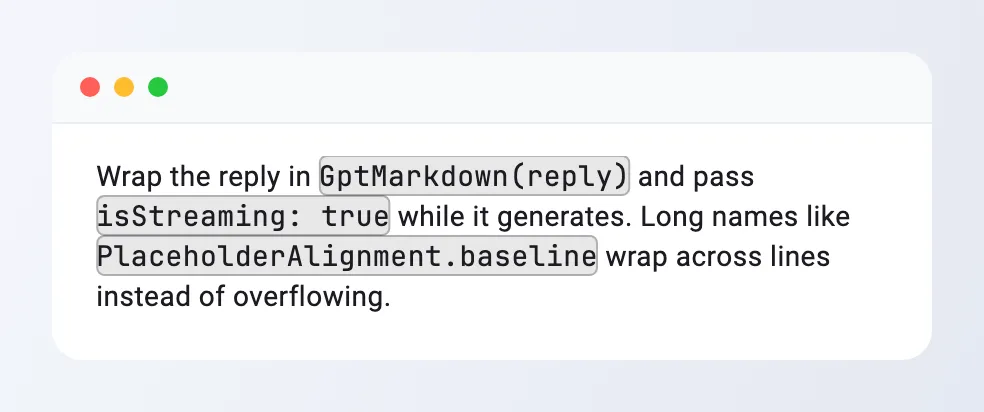
Wrap the reply in `GptMarkdown(reply)` and pass `isStreaming: true` while it generates. Long names like `PlaceholderAlignment.baseline` wrap across lines instead of overflowing.Syntax
Section titled “Syntax”`code`, or `` with ` inside `` when the code contains a backtick.
The content is not Markdown. Inline code is a span, not a widget, so a long
identifier wraps across lines with the paragraph and joins text selection.
Its size is a factor of the surrounding style, so it follows the body text.
Styling
Section titled “Styling”Your app’s mono font:
styleSheet: const GptMarkdownStyleSheet( inlineCode: InlineCodeStyle(fontFamily: 'GeistMono'),),A GitHub-ish chip:
inlineCode: InlineCodeStyle( backgroundColor: const Color(0x14656D76), borderColor: Colors.transparent, borderRadius: const Radius.circular(6), padding: const EdgeInsets.symmetric(horizontal: 5, vertical: 2),),No chip at all, just monospace:
inlineCode: InlineCodeStyle( backgroundColor: Colors.transparent, borderWidth: 0, padding: EdgeInsets.zero,),Inline code is a real TextSpan with the chip painted underneath, once per
line fragment. It wraps across lines, stays selectable, sits on the baseline,
and works inside a link label — none of which a widget-based chip can do.
Per-code styling needs the builder:
GptMarkdown( text, inlineCodeBuilder: (context, code, style, codeStyle) => CodeTextSpan( text: code, style: style, codeStyle: codeStyle.copyWith( backgroundColor: code.startsWith('TODO') ? Colors.amber : null, ), ),)Returning CodeTextSpan keeps the painted chip. Return a plain TextSpan to
drop it.
API reference
Section titled “API reference”InlineCodeStyle
Section titled “InlineCodeStyle”How inline code is drawn.
Set it as GptMarkdownStyleSheet(inlineCode: InlineCodeStyle(…)) on the widget, or in GptMarkdownThemeData for the whole app. Every field is optional; an unset one falls back to the theme, then to the default.
| Field | Type | Description |
|---|---|---|
fontFamily |
String? |
The monospace family. Defaults to the bundled JetBrains Mono, the same family fenced code blocks use. |
fontFamilyPackage |
String? |
The package fontFamily is shipped in. |
fontFamilyFallback |
List<String>? |
Fallback families, used when a glyph is missing from fontFamily. |
fontSizeFactor |
double? |
Code font size relative to the surrounding text. Defaults to 0.94. |
fontWeight |
FontWeight? |
Weight of the code text. Defaults to the surrounding weight. |
color |
Color? |
Colour of the code text. Defaults to ColorScheme.onSurface. |
backgroundColor |
Color? |
Chip fill. Defaults to a tint of ColorScheme.onSurface — 10% on a light scheme, 14% on a dark one, since a light tint over a dark surface reads weaker than the same tint over a light one. |
borderColor |
Color? |
Chip outline. Defaults to a tint of ColorScheme.onSurface — 28% light, 34% dark. |
borderWidth |
double? |
Outline thickness. Defaults to 1.0. Zero disables the outline. |
borderRadius |
Radius? |
Corner radius. Defaults to Radius.circular(4). |
padding |
EdgeInsets? |
Space between the text and the chip edge. Defaults to EdgeInsets.symmetric(vertical: 1) — no horizontal padding, so the chip hugs the code and the surrounding words keep their normal spacing. |
boxHeightStyle |
ui.BoxHeightStyle? |
How the height of each line fragment is measured. |
fontFamilyPackage: more
Defaults to gpt_markdown only while fontFamily is also null. Set
fontFamily to a family of your own and this stays null unless you say
otherwise, which is what you want for an app-level font.
fontSizeFactor: more
Monospace faces read larger than proportional ones at the same point size, so a small reduction keeps the line rhythm even.
borderColor: more
Set to Colors.transparent for a fill with no outline.
padding: more
Horizontal padding, when set, is applied to the outer edges of a wrapped run only — a chip continuing onto the next line is not padded at the break, so the two halves read as one run.
boxHeightStyle: more
Defaults to ui.BoxHeightStyle.tight, which follows the code font’s own
metrics. Use ui.BoxHeightStyle.strut for chips that fill the line box.
| Member | Type | Description |
|---|---|---|
merge(InlineCodeStyle? other) |
InlineCodeStyle |
This style, with any unset field taken from other, field by field. |
resolve(ColorScheme scheme) |
InlineCodeStyle |
This style with every null field filled in from scheme. |
copyWith({…}) |
InlineCodeStyle |
A copy of this style with the given fields replaced. |
static lerp(InlineCodeStyle? a, InlineCodeStyle? b, double t) |
InlineCodeStyle? |
Linearly interpolates between two inline code styles. |
applyTo(TextStyle base) |
TextStyle |
base with this style’s typography applied. |
merge: more
Per field, not per object: a style setting only color keeps other’s
font, padding and border.
applyTo: more
Colours other than color are painted by InlineCodeDecoration, not
carried on the TextStyle — that is what lets the chip have a radius, an
outline and padding while the text still wraps.
inlineCodeBuilder
Section titled “inlineCodeBuilder”Builds the span for inline `code`, replacing the default chip.
Reach for inlineCodeStyle first — it covers font, colours, outline,
radius and padding without a builder. Use this when the styling has to
depend on the code itself.
typedef InlineCodeBuilder = InlineSpan Function( BuildContext context, String code, TextStyle style, InlineCodeStyle codeStyle,);inlineCodeStyle
Section titled “inlineCodeStyle”How inline code is drawn, for this widget only.
Null fields fall back to the ambient ColorScheme, so a single field is
enough:
GptMarkdown( text, inlineCodeStyle: const InlineCodeStyle(fontFamily: 'GeistMono'),)Set GptMarkdownThemeData.inlineCode instead to restyle the whole app.
InlineCodeStyle? inlineCodeStylehighlightBuilder
Section titled “highlightBuilder”Builds a widget for inline `code`.
Used only when inlineCodeBuilder is null, and kept so 1.1.x code keeps
compiling. The result is wrapped in a baseline-aligned WidgetSpan,
which is the shape that made this hook a problem: it cannot wrap across
lines, is skipped by text selection, and does not paint on iOS inside a
link label.
Reach for inlineCodeStyle if you only want to restyle inline code, or
inlineCodeBuilder if you need to build the span yourself.
typedef HighlightBuilder = Widget Function( BuildContext context, String text, TextStyle style,);