
CodeView
Show syntax-highlighted code in Flutter, with line numbers, highlighted lines, a header, tappable tokens, language detection and lazy rendering of long files.
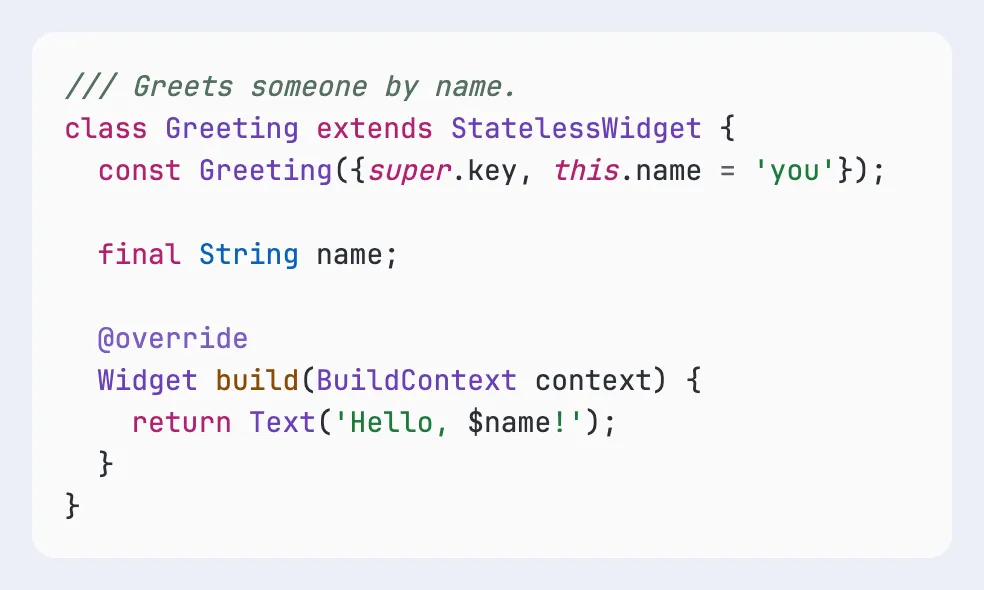
import 'package:material_ui/material_ui.dart';import 'package:val_highlight/languages/dart.dart';import 'package:val_highlight_flutter/val_highlight_flutter.dart';
const source = r'''/// Greets someone by name.class Greeting extends StatelessWidget {  const Greeting({super.key, this.name = 'you'});
  final String name;
  @override  Widget build(BuildContext context) {    return Text('Hello, $name!');  }}''';
class GreetingSource extends StatelessWidget {  const GreetingSource({super.key});
@override Widget build(BuildContext context) { return const CodeView(source, language: dartLanguage); }}import 'package:val_highlight/languages/dart.dart';import 'package:val_highlight_flutter/val_highlight_flutter.dart';
CodeView(source, language: dartLanguage)Give it the source and a language; every other parameter is optional. With the defaults, the theme follows the app’s brightness, the code is selectable, long lines scroll sideways, and the code sits in 16 pixels of the theme’s background colour.
Examples
Section titled “Examples”Line numbers and highlighted lines
Section titled “Line numbers and highlighted lines”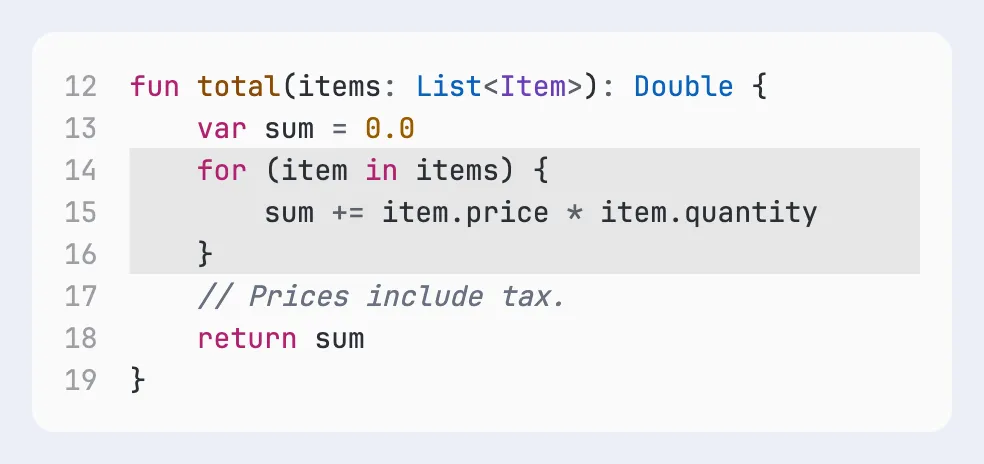
import 'package:material_ui/material_ui.dart';import 'package:val_highlight/languages/kotlin.dart';import 'package:val_highlight_flutter/val_highlight_flutter.dart';
/// Lines 12 to 19 of a longer file.const excerpt = '''fun total(items: List<Item>): Double {    var sum = 0.0    for (item in items) {        sum += item.price * item.quantity    }    // Prices include tax.    return sum}''';
class Excerpt extends StatelessWidget {  const Excerpt({super.key});
  @override  Widget build(BuildContext context) {    return const CodeView(      excerpt,      language: kotlinLanguage,      lineNumbers: true,      firstLineNumber: 12,      highlightedLines: {14, 15, 16},    );  }}
firstLineNumber sets the number of the first line, for an excerpt of a
longer file, and highlightedLines takes the numbers as shown in the gutter.
Without highlightColor, highlighted lines get a translucent band: black at
8% opacity in a light theme, white at 13% in a dark one. Line numbers are
never selected, so copying the code never copies them.
To draw the gutter yourself, pass a gutterBuilder. It gets the line number
as shown and whether that line is highlighted, and is only used while
lineNumbers is on. Return a fixed-width widget so the rows stay aligned:
CodeView( source, language: dartLanguage, lineNumbers: true, gutterBuilder: (context, lineNumber, highlighted) => SizedBox( width: 32, child: Text( '$lineNumber', textAlign: TextAlign.right, style: TextStyle(fontWeight: highlighted ? FontWeight.bold : null), ), ),)A header
Section titled “A header”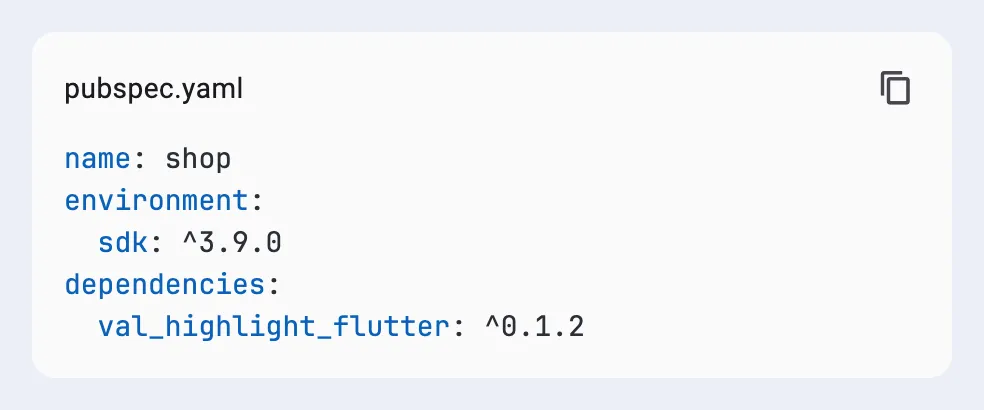
import 'package:flutter/services.dart';import 'package:material_ui/material_ui.dart';import 'package:val_highlight/languages/yaml.dart';import 'package:val_highlight_flutter/val_highlight_flutter.dart';
const source = '''name: shopenvironment:  sdk: ^3.9.0dependencies:  val_highlight_flutter: ^0.1.2''';
class FileCard extends StatelessWidget {  const FileCard({super.key});
  @override  Widget build(BuildContext context) {    return CodeView(      source,      language: yamlLanguage,      padding: const EdgeInsets.fromLTRB(16, 0, 16, 16),      header: Padding(        padding: const EdgeInsets.fromLTRB(16, 4, 4, 0),        child: Row(          children: [            const Text('pubspec.yaml'),            const Spacer(),            IconButton(              tooltip: 'Copy',              icon: const Icon(Icons.copy, size: 18),              onPressed: () =>                  Clipboard.setData(const ClipboardData(text: source)),            ),          ],        ),      ),    );  }}
header places any widget above the code, on the code’s background — a file
name, a language label, a copy button. padding applies to the code below
it; the example trims its top so the header sits close to the code.
Wrapping
Section titled “Wrapping”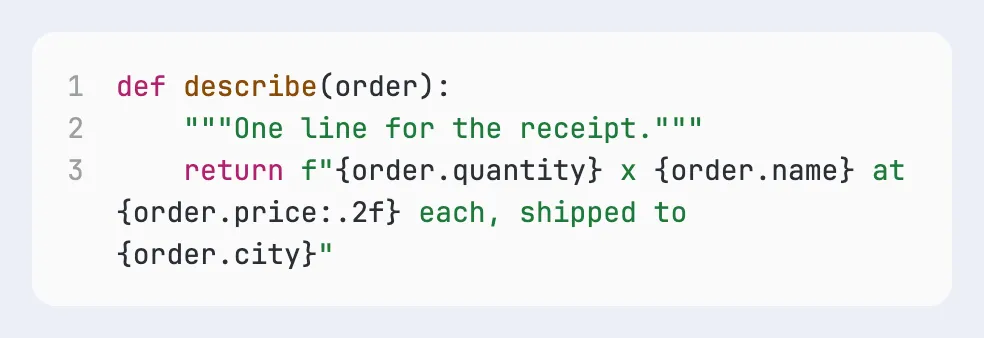
import 'package:material_ui/material_ui.dart';import 'package:val_highlight/languages/python.dart';import 'package:val_highlight_flutter/val_highlight_flutter.dart';
const source = '''def describe(order):    """One line for the receipt."""    return f"{order.quantity} x {order.name} at {order.price:.2f} each, shipped to {order.city}"''';
class Wrapped extends StatelessWidget {  const Wrapped({super.key});
  @override  Widget build(BuildContext context) {    return const CodeView(      source,      language: pythonLanguage,      wrap: true,      lineNumbers: true,    );  }}
wrap: true wraps long lines instead of scrolling them sideways. With line
numbers or highlighted lines, wrapped code is laid out one row per line, so
each number stays beside the first row of its line.
Custom spans
Section titled “Custom spans”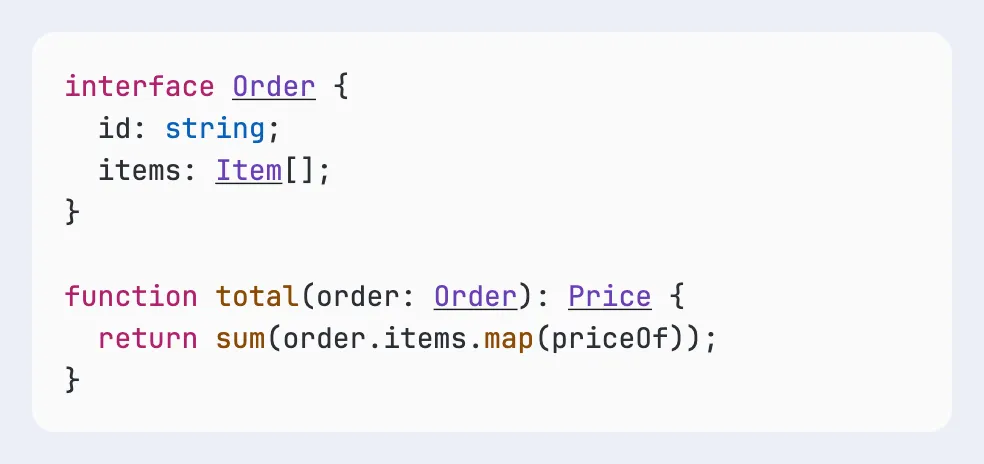
import 'package:material_ui/material_ui.dart';import 'package:val_highlight/languages/typescript.dart';import 'package:val_highlight_flutter/val_highlight_flutter.dart';
const source = '''interface Order {  id: string;  items: Item[];}
function total(order: Order): Price {  return sum(order.items.map(priceOf));}''';
/// Underlines every type name, as links to their definitions would be.class LinkedTypes extends StatelessWidget {  const LinkedTypes({super.key});
  @override  Widget build(BuildContext context) {    return CodeView(      source,      language: typescriptLanguage,      spanBuilder: (context, token, style) {        if (token.scope != Scopes.type) {          return TextSpan(text: token.text, style: style);        }        return TextSpan(          text: token.text,          style: style?.copyWith(decoration: TextDecoration.underline),        );      },    );  }}
spanBuilder builds the span of every token, for links, hover effects,
tooltips or your own styling. style is the token’s themed style, or null
for plain text. Keep text: token.text, or the code on screen changes.
To react to taps instead, pass onTokenTap. Whitespace is not tappable; if
both are set, spanBuilder wins.
CodeView( source, language: dartLanguage, onTokenTap: (token) { if (token.scope == Scopes.type) openDefinition(token.text); },)A CodeToken is one run of text with the same scopes, never crossing a line
break. A whole comment is one token: // TODO: ship is a single comment
token, so look inside token.text to find words within a comment or string.
Unknown languages
Section titled “Unknown languages”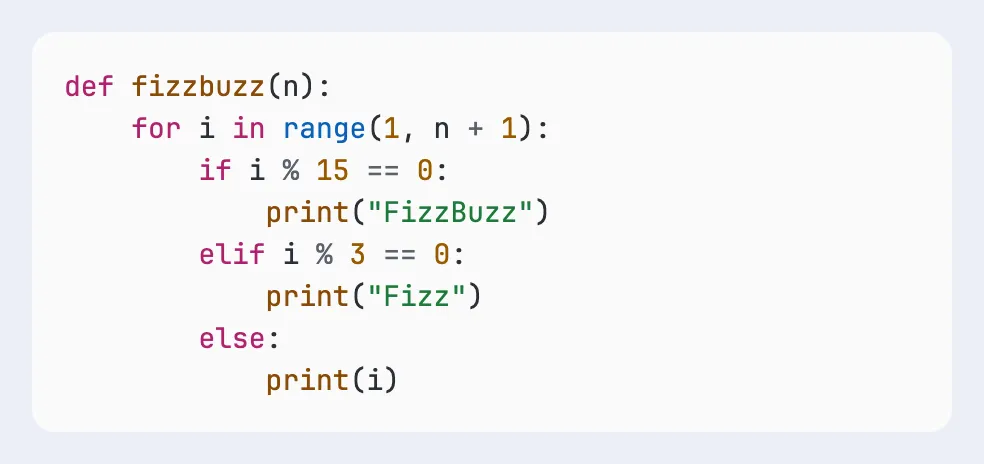
import 'package:material_ui/material_ui.dart';import 'package:val_highlight/languages/all.dart';import 'package:val_highlight_flutter/val_highlight_flutter.dart';
/// A snippet whose language nobody said.const snippet = '''def fizzbuzz(n):    for i in range(1, n + 1):        if i % 15 == 0:            print("FizzBuzz")        elif i % 3 == 0:            print("Fizz")        else:            print(i)''';
class Detected extends StatelessWidget {  const Detected({super.key});
  @override  Widget build(BuildContext context) {    return const CodeView(snippet, detectLanguages: allLanguages);  }}
language is optional. Without it, CodeView runs
language detection over the
candidates in detectLanguages. When that finds nothing — or
detectLanguages is empty, the default — it uses fallbackLanguage, which
is genericLanguage: comments, strings, numbers, common keywords, types,
calls and operators, the things most languages share.
// No highlighting at all for code in an unknown language.CodeView(snippet, fallbackLanguage: plainTextLanguage)Detection is a guess. When you know the language, pass it.
Languages inside languages
Section titled “Languages inside languages”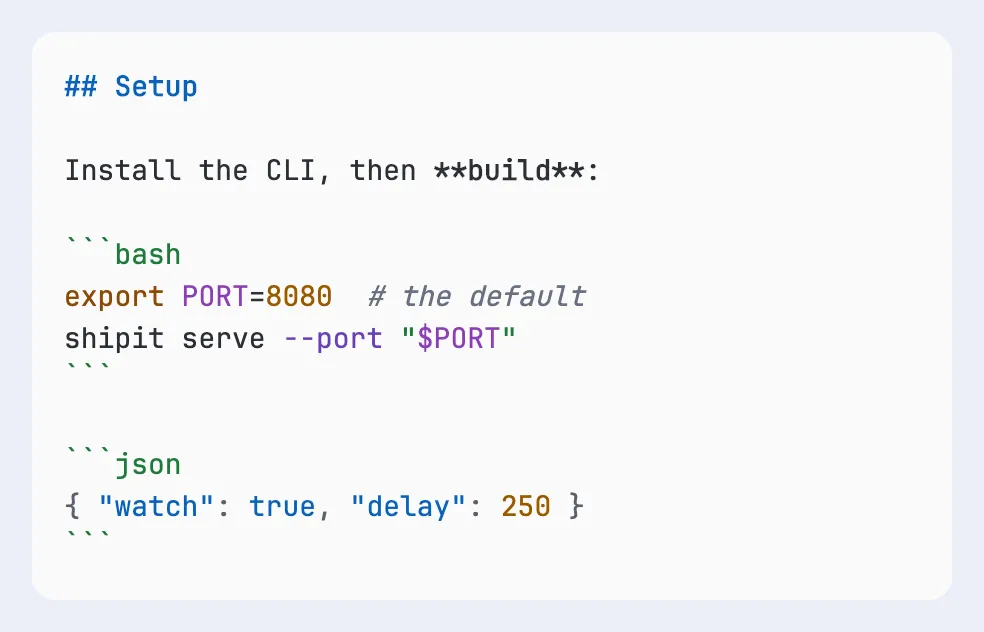
import 'package:material_ui/material_ui.dart';import 'package:val_highlight/languages/all.dart';import 'package:val_highlight_flutter/val_highlight_flutter.dart';
/// Resolves the language named on each fence.final highlighter = CodeHighlighter(registry: allLanguagesRegistry());
const notes = r'''## Setup
Install the CLI, then **build**:
```bashexport PORT=8080  # the defaultshipit serve --port "$PORT"```
```json{ "watch": true, "delay": 250 }```''';
class ReleaseNotes extends StatelessWidget {  const ReleaseNotes({super.key});
  @override  Widget build(BuildContext context) {    return CodeView(      notes,      language: markdownLanguage,      highlighter: highlighter,    );  }}
HTML highlights <style> as CSS and <script> as JavaScript with no setup.
Markdown highlights each fenced block in the language named on its fence,
which it looks up in a registry: give CodeView a CodeHighlighter that has
one. Without a registry, fenced code is shown in the plain code scope.
Long files
Section titled “Long files”CodeView lays short code out as one block of text. When the code has more
than virtualizeAbove lines (1,000 by default) and the view’s height is
bounded — inside an Expanded or a SizedBox, say — it switches to a lazy
list that builds only the rows on screen. Pass scrollController to control
that list. In an unbounded height, such as a Column without Expanded or a
ListView, the code is never laid out lazily.
Expanded( child: CodeView( largeSource, language: dartLanguage, lineNumbers: true, virtualizeAbove: 500, ),)Code of 50,000 characters or more is highlighted in a background isolate while it shows as plain text; on the web, which has no isolates, it is highlighted on a later turn of the event loop instead. Results are cached by code and language — the 32 most recent, by default — so showing the same code again does not highlight it again.
The highlighter
Section titled “The highlighter”Every CodeView uses CodeHighlighter.shared unless you pass highlighter.
Create your own to change the isolate threshold or the cache size, or to give
it a language registry for Markdown fences:
final highlighter = CodeHighlighter( registry: allLanguagesRegistry(), isolateThreshold: 100000, cacheSize: 64,);A language is compiled the first time it is used. To do that before the first code appears, preload the languages you expect; each is compiled as an idle-priority task, one at a time:
CodeHighlighter.shared.preload([dartLanguage, kotlinLanguage, jsonLanguage]);clearCache() empties the result cache.
Themes and text style
Section titled “Themes and text style”theme picks a ValTheme for one view; without it, CodeView follows
CodeTheme and the app’s brightness. textStyle is merged over the default
code style — monospace at 14 pixels with a line height of 1.5 — for
example to set a font family. See Themes.
API reference
Section titled “API reference”CodeView
Section titled “CodeView”Shows syntax-highlighted code.
CodeView(source, language: dartLanguage)Everything else is optional. The theme follows the app’s brightness
(see CodeTheme for app-wide defaults). Results are cached, and inputs
above CodeHighlighter.isolateThreshold are highlighted in a background
isolate while plain text is shown.
Short code renders as one text block. Code with more than
virtualizeAbove lines, placed where its height is bounded, renders one
row per line in a lazy list, so only visible lines are laid out.
const CodeView( String code, { Key? key, Grammar? language, List<Grammar> detectLanguages = const [], Grammar fallbackLanguage = genericLanguage, ValTheme? theme, TextStyle? textStyle, EdgeInsetsGeometry? padding, bool? lineNumbers, int firstLineNumber = 1, Set<int> highlightedLines = const {}, Color? highlightColor, bool wrap = false, bool selectable = true, CodeHighlighter? highlighter, int virtualizeAbove = 1000, CodeGutterBuilder? gutterBuilder, CodeLineBuilder? lineBuilder, Widget? header, ScrollController? scrollController, ValueChanged<CodeToken>? onTokenTap, CodeSpanBuilder? spanBuilder,})Creates a code view.
| Field | Type | Default | Description |
|---|---|---|---|
code |
String |
required | Source code to show. |
language |
Grammar? |
Language of code. When null, the language is detected among detectLanguages; if that fails, fallbackLanguage is used. |
|
fallbackLanguage |
Grammar |
genericLanguage |
Language used when language is null and detection finds nothing. Defaults to genericLanguage, which highlights what most languages share. Use plainTextLanguage for no highlighting. |
detectLanguages |
List<Grammar> |
const [] |
Candidates for detection when language is null. |
theme |
ValTheme? |
Color theme. Defaults to CodeTheme or the built-in light/dark theme. |
|
textStyle |
TextStyle? |
Text style merged over the default monospace style. | |
padding |
EdgeInsetsGeometry? |
Padding inside the background. Defaults to CodeTheme.padding, or 16 on every side. |
|
lineNumbers |
bool? |
Whether to show line numbers. Defaults to CodeTheme.lineNumbers, or false. |
|
firstLineNumber |
int |
1 |
Number shown for the first line. |
highlightedLines |
Set<int> |
const {} |
Line numbers (as shown in the gutter) to highlight. |
highlightColor |
Color? |
Background for highlightedLines. |
|
wrap |
bool |
false |
Whether long lines wrap. When false, code scrolls horizontally. |
selectable |
bool |
true |
Whether the code can be selected and copied. |
highlighter |
CodeHighlighter? |
Highlighter to use. Defaults to CodeHighlighter.shared. |
|
virtualizeAbove |
int |
1000 |
Line count above which rows are built lazily. |
gutterBuilder |
CodeGutterBuilder? |
Custom gutter cells. | |
lineBuilder |
CodeLineBuilder? |
Custom rows. Setting this always renders one row per line. | |
header |
Widget? |
A widget shown above the code, such as a title or copy button. | |
scrollController |
ScrollController? |
Vertical scroll controller for the lazy list. | |
onTokenTap |
ValueChanged<CodeToken>? |
Called when a token is tapped, such as an identifier to jump to. Whitespace is not tappable. | |
spanBuilder |
CodeSpanBuilder? |
Builds each token’s span, for hover effects, links, tooltips or custom styling. Takes priority over onTokenTap. |
CodeToken
Section titled “CodeToken”One piece of highlighted code, as passed to CodeView.onTokenTap and
CodeView.spanBuilder. Pieces never cross a line break.
const CodeToken({ required String text, required int start, required int end, required int line, required List<String> scopes,})Creates a token.
| Field | Type | Default | Description |
|---|---|---|---|
text |
String |
required | The token’s source text. |
start |
int |
required | Start offset in the code. |
end |
int |
required | End offset (exclusive) in the code. |
line |
int |
required | Zero-based line. |
scopes |
List<String> |
required | Scopes from the outermost to the innermost; empty for plain text. |
| Member | Type | Description |
|---|---|---|
scope |
String? |
Innermost scope, or null for plain text. |
CodeGutterBuilder
Section titled “CodeGutterBuilder”Builds the gutter cell for lineNumber. Return a fixed-width widget so
rows stay aligned.
typedef CodeGutterBuilder = Widget Function( BuildContext context, int lineNumber, bool highlighted,)CodeLineBuilder
Section titled “CodeLineBuilder”Wraps the row for zero-based line. child is the default row.
typedef CodeLineBuilder = Widget Function( BuildContext context, int line, Widget child,)CodeSpanBuilder
Section titled “CodeSpanBuilder”Builds the span for one token, replacing the default. style is the
token’s themed style (null for plain text). Return a TextSpan with
text: token.text so the text stays unchanged.
typedef CodeSpanBuilder = InlineSpan Function( BuildContext context, CodeToken token, TextStyle? style,)CodeHighlighter
Section titled “CodeHighlighter”Highlights code for widgets, with a result cache and background isolates for large inputs.
Widgets use CodeHighlighter.shared unless given another. Create your
own to change the thresholds or to resolve Markdown code fences:
final highlighter = CodeHighlighter(registry: allLanguagesRegistry());CodeHighlighter({ LanguageRegistry? registry, int isolateThreshold = 50000, int cacheSize = 32,})Creates a highlighter.
| Field | Type | Default | Description |
|---|---|---|---|
registry |
LanguageRegistry? |
Resolves languages named inside code, such as Markdown fences. | |
isolateThreshold |
int |
50000 |
Inputs with at least this many characters are highlighted in a background isolate by highlight. On the web, which has no isolates, they are highlighted on the next event-loop turn instead. |
cacheSize |
int |
32 |
Number of results kept in the cache. |
| Member | Type | Description |
|---|---|---|
static shared |
CodeHighlighter |
The default highlighter used by widgets. |
cached(String code, Grammar language) |
HighlightResult? |
Cached result for code in language, if any. |
usesIsolate(String code) |
bool |
Whether highlight would use a background isolate for code. |
highlightSync(String code, Grammar language) |
HighlightResult |
Highlights code on the current isolate. |
highlight(String code, Grammar language) |
Future<HighlightResult> |
Highlights code, using a background isolate for large inputs. |
preload(Iterable<Grammar> languages) |
Future<void> |
Compiles languages ahead of time, one per idle frame, so the first code shown in each language has no compile delay (about 1–3 ms per language otherwise). |
clearCache() |
void |
Empties the cache. |