
CodeField
A code editor for Flutter — auto-closing brackets and quotes, indentation, comment toggling, bracket matching and line numbers, re-highlighting only what each edit can affect.
import 'package:material_ui/material_ui.dart';import 'package:val_highlight/languages/python.dart';import 'package:val_highlight_flutter/val_highlight_flutter.dart';
const source = '''from dataclasses import dataclass

@dataclassclass Order:    sku: str    qty: int = 1
    def total(self, price: float) -> float:        return self.qty * price''';
class OrderEditor extends StatefulWidget {  const OrderEditor({super.key});
  @override  State<OrderEditor> createState() => _OrderEditorState();}
class _OrderEditorState extends State<OrderEditor> {  final controller = HighlightTextController(    language: pythonLanguage,    text: source,  );
  @override  void dispose() {    controller.dispose();    super.dispose();  }
  @override  Widget build(BuildContext context) {    // CodeField paints no background; paint the theme's behind it.    final theme = CodeTheme.resolve(context, controller.theme);    return ColoredBox(      color: Color(theme.root.background!),      child: Padding(        padding: const EdgeInsets.all(16),        child: CodeField(          controller: controller,          lineNumbers: true,          highlightCurrentLine: true,        ),      ),    );  }}
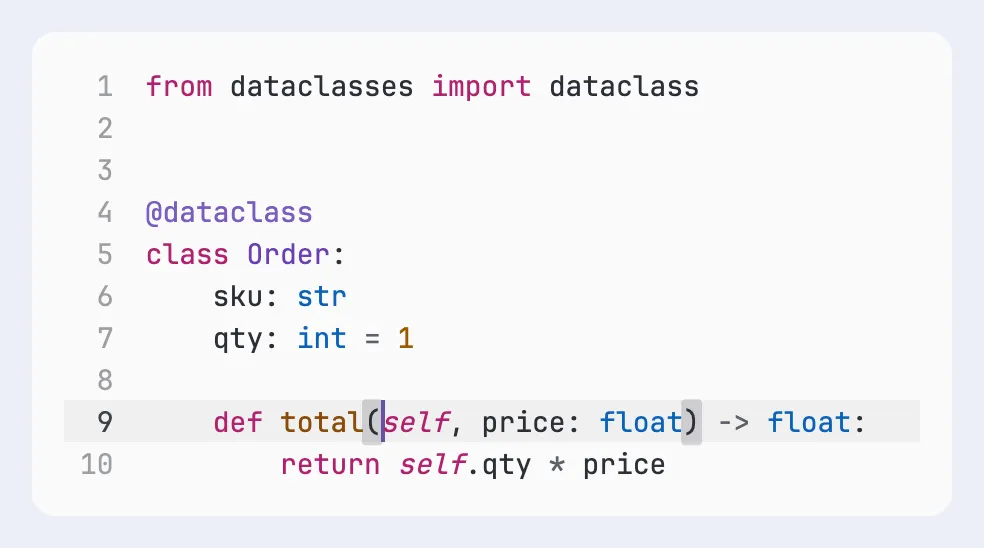
In the preview the caret has been put after total(: the caret’s line is
highlighted, and the parenthesis before the caret and its match are marked.
CodeField is a multi-line TextField for code. Its text, language and theme
live in a HighlightTextController: create it once, change
controller.language or controller.theme whenever you like, and dispose it
with the widget that owns it. controller.result is the current
HighlightResult.
CodeField paints no background, so paint the theme’s behind it, as the
example does. CodeTheme.resolve(context, controller.theme) returns the
theme the field uses. Its default decoration has no border and no padding.
Each edit re-highlights only the lines it can affect — see incremental highlighting.
What typing does
Section titled “What typing does”With the defaults:
- Brackets and quotes close themselves when the caret is followed by
whitespace, the end of the text, or one of
) ] } > ; : , . =. Typing the closer steps over an automatic one, and Backspace between an empty automatic pair deletes both. - Quotes stay single after a letter or digit, so
don'tis left alone, and inside strings and comments. - Typing a bracket or quote over a selection wraps the selection.
- Enter keeps the current line’s indentation, and adds one level after
{,[,(or:. Between a pair, as in{|}, the closer moves to its own line below the caret. - Tab inserts one indent at the caret, or replaces a selection within a line; with a selection across lines it indents every non-empty line. Shift+Tab removes one indent from each line the selection touches.
- Ctrl+/ (Cmd+/ on macOS and iOS) comments the lines the selection
touches, or uncomments them when every non-blank one already starts with
the comment marker. Markers line up at the smallest indentation, and blank
lines are left alone. Doc comments (
///,//!) and shebangs are commented out like any other line rather than taken for comments. A language with only block comments, such as CSS or HTML, wraps the selection — or the caret’s line — in them. - The bracket next to the caret and its match get a background. The one before the caret is tried first.
- Autocorrect, suggestions, smart quotes and smart dashes are off.
Brackets, quotes and comment markers come from the language’s
EditingSyntax, so
Python comments with #, SQL with --, and Rust doesn’t pair ', which
also starts a lifetime. Typing is handled as text changes, not key presses,
so it behaves the same on hardware keyboards, on-screen keyboards and voice
input. Text an input method is still composing is never changed.
Configure editing
Section titled “Configure editing”Turn single behaviours off with a CodeEditing, or all of them with
CodeEditing.none:
CodeField( controller: controller, editing: const CodeEditing(autoClose: false),)syntax replaces the language’s comment markers, brackets and quotes, and
indent sets what Tab inserts and Shift+Tab removes — two spaces by default:
CodeField( controller: controller, indent: ' ', editing: CodeEditing( syntax: EditingSyntax.cStyle.copyWith(quotes: '"\'`'), ),)Line numbers and line highlights
Section titled “Line numbers and line highlights”CodeField( controller: controller, lineNumbers: true, highlightCurrentLine: true, highlightedLines: {3, 4},)The gutter, the line bands and the bracket marks are painted from the text’s
own layout, so they line up with wrapped lines, only visible lines are
painted, and they follow the text when a font finishes loading late. The
gutter has room for at least two digits and widens when the line count gains
one. firstLineNumber, gutterStyle, highlightColor, currentLineColor
and bracketColor change the rest; see the API reference.
Shortcuts
Section titled “Shortcuts”Each shortcut sends an intent: IndentCodeIntent (Tab), OutdentCodeIntent
(Shift+Tab) and ToggleCommentIntent (Ctrl+/ or Cmd+/). The defaults are in
CodeField.defaultShortcuts. Rebind keys with shortcuts, or pass
const {} to remove them all, so Tab moves focus as in any other field:
CodeField(controller: controller, shortcuts: const {})To change what an intent does, put an Actions widget above the field:
Actions( actions: { ToggleCommentIntent: CallbackAction<ToggleCommentIntent>( onInvoke: (_) => myToggle(), ), }, child: CodeField(controller: controller),)The comment toggle is also a function, toggleComment, which takes a
TextEditingValue and an EditingSyntax and returns the new value — or
null when the language has no comments. Pass result so a marker inside a
string is not taken for a comment:
final updated = toggleComment( controller.value, EditingSyntax.of(controller.language), result: controller.result,);if (updated != null) controller.value = updated;undoController is the field’s undo history, as on a TextField. Every edit
the field makes itself — an auto-closed pair, a toggled comment, an indent —
is one undo step.
Large documents
Section titled “Large documents”Flutter lays out a text field’s whole text on every change, and styled runs
make that slower. So for a document of more than styleAllBelow lines (300
by default), CodeField colours only the visible lines plus margin lines
on each side (150 by default), and the rest is plain text. The coloured
window follows scrolling — the field’s own, or that of a scroll view around
it. Moving the window lays the whole field out again, so while you scroll it
moves only when the visible lines come close to its edge, and it is centred
again once scrolling stops.
API reference
Section titled “API reference”CodeField
Section titled “CodeField”A code editor: a multi-line TextField driven by a
HighlightTextController, which stays fast on large documents.
CodeField(controller: HighlightTextController(language: dartLanguage))Typing follows editing: Enter keeps the indentation, brackets and
quotes close themselves, and the bracket at the caret is matched. Keys
follow shortcuts: Tab and Shift+Tab indent and outdent, and Ctrl+/
(Cmd+/ on Apple platforms) toggles comments. Each key sends an Intent
(IndentCodeIntent, OutdentCodeIntent, ToggleCommentIntent); an
Actions widget above the field can override what they do.
Set lineNumbers for a gutter, highlightedLines to mark lines, and
highlightCurrentLine to mark the caret’s line. These are painted from
the text’s own layout, so wrapped lines line up.
Laying out a text field is proportional to its styled runs, so for
documents longer than styleAllBelow lines only the visible lines, plus
margin lines on each side, are coloured. The window follows scrolling
(of the field itself or of an enclosing scroll view) and is computed from
the laid-out text, so wrapped lines are handled exactly.
const CodeField({ Key? key, required HighlightTextController controller, FocusNode? focusNode, TextStyle? style, InputDecoration? decoration = const InputDecoration(border: InputBorder.none, isCollapsed: true), bool expands = false, int? minLines, int? maxLines, bool readOnly = false, bool autofocus = false, ValueChanged<String>? onChanged, ScrollController? scrollController, TextAlignVertical? textAlignVertical, int styleAllBelow = 300, int margin = 150, String indent = ' ', CodeEditing editing = const CodeEditing(), Map<ShortcutActivator, Intent>? shortcuts, List<TextInputFormatter>? inputFormatters, UndoHistoryController? undoController, bool lineNumbers = false, int firstLineNumber = 1, TextStyle? gutterStyle, Set<int> highlightedLines = const {}, Color? highlightColor, bool highlightCurrentLine = false, Color? currentLineColor, Color? bracketColor,})Creates a code editor.
| Field | Type | Default | Description |
|---|---|---|---|
controller |
HighlightTextController |
required | The text and its highlighting. |
focusNode |
FocusNode? |
Focus node for the field. | |
style |
TextStyle? |
Text style merged over the default code style. | |
decoration |
InputDecoration? |
const InputDecoration(border: InputBorder.none, isCollapsed: true) |
Decoration around the field. Defaults to none. |
expands |
bool |
false |
Whether the field fills its parent’s height. |
minLines |
int? |
Minimum visible lines. | |
maxLines |
int? |
Maximum visible lines before the field scrolls; null to grow. |
|
readOnly |
bool |
false |
Whether the text is read-only. |
autofocus |
bool |
false |
Whether to focus the field on first build. |
onChanged |
ValueChanged<String>? |
Called when the user edits the text. | |
scrollController |
ScrollController? |
Scroll controller for the field’s own scrolling. | |
textAlignVertical |
TextAlignVertical? |
Vertical alignment of the text. | |
styleAllBelow |
int |
300 |
Documents with at most this many lines are coloured in full. |
margin |
int |
150 |
Lines coloured beyond each edge of the visible area. |
indent |
String |
' ' |
Text inserted by Tab and removed by Shift+Tab, such as two spaces or '\t'. Enter keeps the current line’s indentation, adding one level after an opening {, [, ( or :. |
editing |
CodeEditing |
const CodeEditing() |
What typing, Enter and Backspace do beyond inserting text. Use CodeEditing.none for a plain text field. |
shortcuts |
Map<ShortcutActivator, Intent>? |
Keys and the intents they send. Defaults to defaultShortcuts; pass const {} for none, so Tab moves focus as in other fields. |
|
inputFormatters |
List<TextInputFormatter>? |
Formatters applied after the editing behaviour, such as a length limit. | |
undoController |
UndoHistoryController? |
Controls the field’s undo history, as in TextField.undoController. Every edit the field makes itself — an auto-closed pair, a toggled comment, an indent — is a single undo step. |
|
lineNumbers |
bool |
false |
Whether to show line numbers in a gutter. |
firstLineNumber |
int |
1 |
Number shown for the first line. |
gutterStyle |
TextStyle? |
Style of the line numbers. Defaults to the code style in a faded text color. | |
highlightedLines |
Set<int> |
const {} |
Line numbers, as shown in the gutter, to highlight. |
highlightColor |
Color? |
Background of highlightedLines. |
|
highlightCurrentLine |
bool |
false |
Whether to highlight the line with the caret. |
currentLineColor |
Color? |
Background of the caret’s line when highlightCurrentLine is set. |
|
bracketColor |
Color? |
Background of a matched bracket pair, when CodeEditing.matchBrackets is on. |
| Member | Type | Description |
|---|---|---|
static defaultShortcuts |
Map<ShortcutActivator, Intent> |
The default shortcuts: Tab, Shift+Tab, and Ctrl+/ (Cmd+/ on macOS and iOS). |
CodeEditing
Section titled “CodeEditing”Editing behaviour for CodeField: what typing, Enter and Backspace do
beyond inserting text.
Brackets, quotes and comment markers come from the language’s
EditingSyntax, unless syntax overrides them.
CodeField( controller: controller, editing: const CodeEditing(autoClose: false),)Use CodeEditing.none to turn every behaviour off.
const CodeEditing({ bool autoIndent = true, bool autoClose = true, bool wrapSelection = true, bool matchBrackets = true, EditingSyntax? syntax,})Creates editing behaviour. Everything is on by default.
| Field | Type | Default | Description |
|---|---|---|---|
autoIndent |
bool |
true |
Whether Enter keeps the current line’s indentation, adds a level after an opening bracket or :, and moves a closing bracket right after the caret onto its own line. |
autoClose |
bool |
true |
Whether typing an opening bracket or quote also inserts its closing one. |
wrapSelection |
bool |
true |
Whether typing an opening bracket or quote over a selection wraps the selection instead of replacing it. |
matchBrackets |
bool |
true |
Whether the bracket next to the caret and its match are marked with a background (CodeField.bracketColor). The bracket before the caret is tried first, then the one after it. |
syntax |
EditingSyntax? |
Comment markers, brackets and quotes to use instead of the language’s. |
autoClose: more
Brackets close when the caret is followed by whitespace, the end of
the text or a closing character such as ) or ;. Quotes also stay
single after a letter or digit and inside strings and comments.
Typing a closer that was inserted automatically steps over it, and
Backspace between an empty automatic pair deletes both.
| Member | Type | Description |
|---|---|---|
static none |
CodeEditing |
Plain text editing: no auto-indent, auto-closing, wrapping or bracket matching. |
syntaxFor(Grammar language) |
EditingSyntax |
The syntax used for language: syntax, or the language’s own. |
copyWith({…}) |
CodeEditing |
Returns a copy with the given fields replaced. |
IndentCodeIntent
Section titled “IndentCodeIntent”Indents the selected lines, or inserts an indent at the caret. Bound to
Tab in CodeField.
const IndentCodeIntent()Creates an indent intent.
OutdentCodeIntent
Section titled “OutdentCodeIntent”Removes one indent from the selected lines. Bound to Shift+Tab in
CodeField.
const OutdentCodeIntent()Creates an outdent intent.
ToggleCommentIntent
Section titled “ToggleCommentIntent”Comments or uncomments the selected lines. Bound to Ctrl+/ (Cmd+/ on
Apple platforms) in CodeField.
const ToggleCommentIntent()Creates a toggle-comment intent.
toggleComment
Section titled “toggleComment”Comments or uncomments the lines touched by the selection, using
syntax’s markers. Returns null when the language has no comments.
With a line comment marker, the lines are uncommented when every
non-blank one already starts with the marker, and commented otherwise.
Markers are aligned at the smallest indentation, and blank lines are
left alone. result, when it highlights value’s text, makes sure a
marker inside a string is not taken for a comment.
With only a block comment, as in CSS or HTML, the selection (or the caret’s line) is wrapped in the markers, or unwrapped if it already is.
TextEditingValue? toggleComment( TextEditingValue value, EditingSyntax syntax, { HighlightResult? result,})